
WAN 2.7 Generator
Alibaba's thinking-mode image model with smart composition. Create stunning visuals with intelligent prompt understanding and 14 aspect ratios.
Get 10 free credits on sign up
Prompt
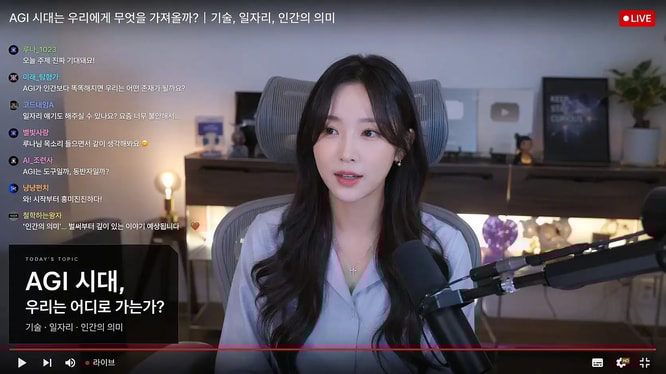
Live-stream studio screenshot featuring a female creator speaking on camera, Korean live chat overlay on the left, red LIVE badge in the corner, podcast microphone in foreground, cozy desk setup with ambient lighting, YouTube-style livestream thumbnail, realistic creator economy scene.
Why Choose WAN 2.7?
Intelligent composition with thinking mode and broad format support
Thinking Mode
WAN 2.7's thinking mode reasons about composition and prompt alignment, producing more thoughtful and well-structured images.
14 Aspect Ratios
The widest format support including 1:1, 1:4, 1:8, 2:3, 3:2, 3:4, 4:3, 4:5, 5:4, 8:1, 9:16, 16:9, and 21:9.
Smart Composition
WAN 2.7 intelligently arranges elements in the frame for balanced, visually appealing results.
Image Editing
Upload up to 9 reference images for precise editing that preserves structure and subjects with WAN 2.7.
1K and 2K Output
Generate images in 1K or 2K resolution with WAN 2.7 at a consistent 5 credits per image.
Style Presets
Apply photography, anime, oil painting, 3D render, cyberpunk, and 11 more artistic styles instantly.
What Can You Create with WAN 2.7?
Intelligent generation for diverse visual needs
Social Media Content
Create perfectly sized content for any platform with WAN 2.7's 14 aspect ratios — the most format options available.
Smart Compositions
Leverage WAN 2.7's thinking mode for complex scenes that require thoughtful element placement and visual balance.
Image Editing
Edit existing photos with natural language instructions. WAN 2.7 preserves structure while applying your desired changes.
Cost-Effective Generation
At 5 credits per image with no quality multipliers, WAN 2.7 offers consistent and predictable pricing.
How to Use WAN 2.7
Create images with intelligent composition in three steps
Write Your Prompt
Describe your image in detail. WAN 2.7's thinking mode will reason about the best way to compose your scene.
Configure & Upload
Choose aspect ratio, resolution, and style. Optionally upload reference images for WAN 2.7's editing mode.
Generate & Download
Click generate and get your WAN 2.7 image. The thinking mode ensures well-composed output every time.
WAN 2.7 FAQ
Common questions about using WAN 2.7 on GPTImg
What is WAN 2.7's thinking mode?
When enabled, WAN 2.7 spends additional processing time reasoning about composition, element placement, and prompt alignment to produce more thoughtful images.
How much does WAN 2.7 cost?
WAN 2.7 costs a flat 5 credits per image regardless of resolution (1K or 2K), making it one of the most predictable models on GPTImg.
How many aspect ratios does WAN 2.7 support?
WAN 2.7 supports 14 aspect ratios — the most of any model on GPTImg — including unique formats like 1:4, 1:8, 4:1, and 8:1.
Can WAN 2.7 edit existing images?
Yes. Use the Image Edit mode to upload up to 9 reference images and describe changes in natural language with WAN 2.7.
Is WAN 2.7 better than GPT Image 2?
Each model has strengths. WAN 2.7 offers more aspect ratios and thinking mode at a lower cost. GPT Image 2 excels at natural language editing and character consistency.
How fast is WAN 2.7 with thinking mode?
With thinking mode enabled, WAN 2.7 may take slightly longer (15-40 seconds) but produces better-composed results. You can disable it for faster generation.
Start Creating with All-in-one AI Creative Platform
gptimg.ai is your all-in-one AI creative platform featuring GPT Image 2, Nano Banana, and Seedream — generate images, create videos, and compose music. Built for creators, marketing, design, and content teams.